
NREGA MIS report: open VB‑G RAM G reports online
Pick your state and a report, and the official NREGA (MGNREGA) MIS report opens directly. No sum to solve first, no login. A second finder opens the reports of any Gram Panchayat.
नरेगा / मनरेगा (VB-G RAM G) की MIS रिपोर्ट सीधे खोलें: राज्य और रिपोर्ट चुनें।
On this page
- MIS report at a glance
- How to open an NREGA MIS report
- What is the NREGA MIS report?
- State MIS reports you can open from this page
- How to check FTO status in the MIS
- Open the reports of your Gram Panchayat (GP report)
- Which MIS report answers your question
- The national MIS pages, and MGNREGA reports for earlier years
- Common questions about the NREGA MIS report
- About this page
MIS report at a glance
- MIS means
- Management Information System, the scheme’s online record
- What it holds
- Registrations, demand for work, muster rolls, works, payments and funds
- Who uses it
- Panchayat and block staff, officers, social auditors and workers
- Opens from this page
- 30 state reports, 17 of them also for one district, and 5 panchayat reports
- Login
- Not needed to view reports
- Fee
- Free
How to open an NREGA MIS report
You need only a phone or computer with internet. We tested these steps on the date shown at the top of this page.
- Choose your stateUse the form at the top of this page.
- Choose the reportPick it from the list, or tap one of the five popular reports under the form.
- Choose a district, if you wantThe list fills in once the state is chosen. Leave it on “Whole state” to see every district. For reports that have no district view, the choice is greyed out.
- Tap “Open report”The official report opens in a new tab on vbgramgrep.dord.gov.in.
- Go deeper on the official pageMost reports are tables. Tap a district or a block name in the table to open the next level.
What is the NREGA MIS report?
Every job card, demand for work, muster roll, work and payment under VB-G RAM G, the scheme that replaced MGNREGA (NREGA), is entered on the official portal by panchayat and block staff. The MIS turns those entries into reports that anyone can open. People call it the NREGA MIS report, the MGNREGA MIS report or the MIS report.
MIS रिपोर्ट का मतलब: मैनेजमेंट इन्फ़ॉर्मेशन सिस्टम रिपोर्ट। यह नरेगा के जॉब कार्ड, काम, हाज़िरी और भुगतान का ऑनलाइन रिकॉर्ड है, जिसे कोई भी देख सकता है।
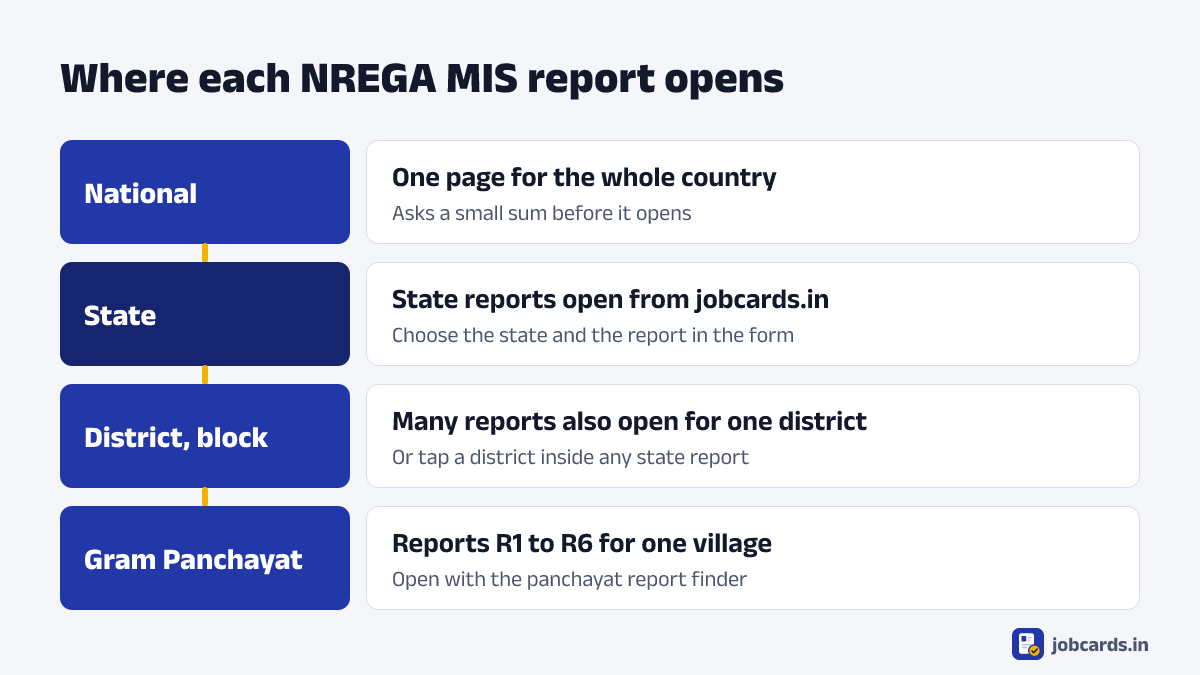
Reports exist at each level. A state report has one line for each district. Tap a district and it shows the blocks. Each Gram Panchayat also has its own page of reports. A worker’s own records, such as the job card register and the muster roll, are in the panchayat reports. Staff and officers mostly use the state and district reports.
State MIS reports you can open from this page
We checked each of these on the official site on the date shown at the top. Every one opened with data when reached through the form.
| Group | Reports |
|---|---|
| Wage payments (FTO) | FTO status, daily squaring of FTO, FTO pending status, FTO pendency day wise, FTO response delay, FTO pending with co-operative banks, delayed payment |
| Job cards and employment | Gramin Rozgar Guarantee Cards, verification of job cards, registered and employed persons by age, employment provided period wise, households that completed 100 days, progress report |
| Works | Works, work status, assets created, work progress, yearly work completion rate, work progress and performance analysis |
| Funds | Financial statement, labour and material ratio, outlays and outcomes, expenditure in the pipeline |
| Accounts and approvals | Frozen accounts, vendor, worker and DPR frozen status, DSC enrolment, PFMS / IFMIS DSC verification |
| Complaints | Complaint register |
Seventeen of the thirty can also be opened for a single district, among them FTO status, FTO pending status, delayed payment, work status, assets created and verification of job cards. For the rest, the state report opens and you go deeper on the official page.
How to check FTO status in the MIS
FTO stands for Fund Transfer Order. It is the payment order a block sends to the bank so that wages reach workers’ accounts. If wages are late, the FTO status report shows where the order is stuck.
- Choose your state and tap “FTO status”It is the first popular report under the form.
- Choose your district and open the reportThe official report, numbered R8.1.1, opens with one line for each block.
- Read across your block’s lineIt shows the FTOs generated, how many each of the two signatories has signed, how many were sent to the bank or PFMS, and how many were processed or are still pending.
The report has separate tabs for wages, material and other payments. Wages is the one workers need. To check one payment in your own bank account, use our PFMS payment status page.
Open the reports of your Gram Panchayat (GP report)
Choose your panchayat, then a report. Leave the report on “All reports of the panchayat” to open the panchayat’s full page, titled “Gram Panchayat Reports”.
Five reports can be opened directly from here: the Job card/Employment Register, the Muster Roll, unemployment allowances, photos of works and the complaint register. When we tested the others from an outside link, the portal answered with an error or “Session Expired”. They open only from the panchayat’s own page, so choose “All reports of the panchayat” for those and tap the report there.
What is on the panchayat’s page
| Group | Reports in it |
|---|---|
| R1. Job Card / Registration | Registration caste wise, job cards not in use, Job card/Employment Register, registration application register, job cards pending verification |
| R2. Demand, Allocation and Muster roll | Demand for work, employment offered, 100 days employment exhausted, unemployment allowances, alert on attendance, work status, material procured, Muster Roll |
| R3. Work | Work expenditure, consolidated report of payment to worker, work-wise payment to worker, photos of works, plantation maintenance |
| R4. Irregularities / Analysis | Wage and material ratio, labour engaged by fortnight and muster |
| R5. IPPE | Application register, list of work |
| R6. Registers | Register No. 1 parts A to D, work register, material register, complaint register |
Which MIS report answers your question
- Is my family registered? Panchayat report “Job card / Employment Register”. Our job card list finder opens the same list.
- Were my days counted? Panchayat report “Muster roll”. The attendance page shows today’s hajiri.
- Has my block sent the payment order? State report “FTO status” for your district.
- Why is my payment late? State reports “Delayed payment” and “FTO pending status”.
- Which works are running? State report “Work status”, or the panchayat’s page for one village.
- Where do I see a complaint? “Complaint register”, for the state or for your panchayat.
The national MIS pages, and MGNREGA reports for earlier years
The portal has one page that lists every MIS report for the whole country. It asks you to solve a small sum, such as “What will be 34 – 26”, before it shows the reports. The sum is there to keep robots out, so you have to do that step yourself.
The older MGNREGA MIS page is still online on the Department’s website, and it asks a sum in the same way. It is the place to look for reports from the MGNREGA years, before VB-G RAM G began on 1 July 2026.
On the portal’s own menu the national page is under Analytics & Reports, then MIS Report.
Common questions about the NREGA MIS report
What is MIS report in NREGA?
MIS stands for Management Information System. It is the online record of the scheme, now called VB-G RAM G. It shows registrations, demand for work, muster rolls, works, payments and funds as public reports.
How do I open the NREGA MIS report for my state?
Use the form at the top of this page. Choose your state and the report, add a district if you want, then tap Open report. The official report opens in a new tab.
How do I open the MIS report of my Gram Panchayat?
Use the panchayat report finder on this page. Choose your state, district, block and Gram Panchayat, pick a report, and tap Open panchayat report.
How can I check FTO status?
Choose your state, tap FTO status under the form, choose your district and open the report. It shows, for each block, how many Fund Transfer Orders were generated, signed, sent to the bank and processed.
Is the MGNREGA MIS report still available?
Yes. Reports under the new scheme are on the VB-G RAM G portal, which this page opens. The older MGNREGA MIS page is also still online for the earlier years, and we link to it above.
Do I need a login to see MIS reports?
No. Viewing reports is open to everyone. Only data entry needs a login, and that is done by panchayat and block staff.
Where is the PO login or GP login?
Logins are for staff who enter data. On the home page of the official portal, open the Login menu or pick your state under Quick login. You do not need a login for any report on this page.
Why does the MIS page ask me to solve a sum?
The national MIS page shows a small sum before the reports to stop automated programs. The state and panchayat reports opened from this page do not ask for it.
Why do some panchayat reports show an error?
Most reports on a panchayat’s page open only after that page itself has been opened. From an outside link they answer with an error or Session Expired. Open the panchayat’s page first, then tap the report.
About this page
Written and checked by Kapil and the jobcards.in team. We open the official portal ourselves before we write a step down, and we test that each report in our lists opens. When a menu or a rule changes, we update the page and the date at the top. How we write and check our pages.
Sources
- VB-G RAM G official portal, Department of Rural Development, Government of India
- MIS Report page of the official reports site
- MGNREGA MIS page, Department of Rural Development
If you find a mistake, tell us and we will correct it.
More tools on jobcards.in
- Job card listFind your name and job card number by panchayat
- Attendance checkToday's hajiri and your panchayat's muster roll
- PFMS payment statusCheck DBT payments by bank account
- PMAY-G beneficiary statusYour rural housing record, by registration number
- UP ration card listThe NFSA eligibility list, district by district
- Bihar ration card checkRC details by ration card number